Showing posts with label Product Release. Show all posts

Friday, June 19, 2015

Webinar - Test Driven Application development on June 28th 8:00 PM

We are starting webinar in DotNetSpider. You may find many good technical sessions soon from DotNetSpider.

Fist webinar will be presented by Mr.. Gaurav Arora who is one of the senior member of DotNetSpider.

Gaurav will be presenting “Test driven application development” in his webinar scheduled on 28th June 8:00 PM

Request all my readers to make use of this opportunity. We will be soon coming up with Azure series…wait and watch.

Please joined this session on 28th June 8:00 PM to 9:30 PM.

You may just open the below link to join this session.

https://www.livemeeting.com/cc/mvp/join
Meeting ID: WP8QRC
Entry Code: g)$F3SBxp

Thursday, January 29, 2015

Compatibility level 90 is deprecated in MS SQL 2014

As we are going to use MS SQL 2014 in near future, compatibility level setting is one of the important thing we should know. Especially when you are migrating SQL from older version we should set this compatibility level properly otherwise your database migration will be a flop.

In MS SQL 2014 Microsoft declared that compatibility level 90 is deprecated.

What it means for the DBA or a developer?

To know the answer for the above question first you should know what is compatibility level. I will give you a short table below to understand how it is related to each version MS SQL.
Compatibility Level
MS SQL Server Version
Applies to
80 SQL Server 2000 SQL Server 2008 through SQL Server 2008 R2
90 SQL Server 2005 SQL Server 2008 through SQL Server 2012
100 SQL Server 2008 and SQL Server 2008 R2 SQL Server 2008 through SQL Server 2014
110 SQL Server 2012 SQL Server 2012 through SQL Server 2014
120 SQL Server 2014 SQL Server 2014 through SQL Server 2014
 
Now you might be clear what is this compatibility level all about and why Level 90 is deprecated in SQL 2014.

When Microsoft says compatibility level 90 is deprecated which means when you are migrating from SQL server 2005 or older version to SQL server 2014 you have to change the compatibility level from 90 to 100, that is the minimum compatibility level SQL 2014 supports.

Once you install SQL server 2014 then the default compatibility level will be set it as 120. Where as when you migrate your database from older version database retains its existing compatibility level if it is at least 100, which means it retains its compatibility level if the database you are migrating is SQL 2008 or above.

So here comes the catch. What will happen if you are migrating SQL server 2005 or older version. In such cases we have to change the compatibility level to 100 manually.
Microsoft recommends below steps to change the compatibility level,
 
  1. Login to the database and set the database to single-user access mode by using ALTER DATABASE SET SINGLE_USER.
  2. Change the compatibility level of the database.
    ALTER DATABASE AdventureWorks2012
    SET COMPATIBILITY_LEVEL = 100;
    GO
  3. Put the database in multiuser access mode by using ALTER DATABASE SET MULTI_USER.

Other option is login to the database. Select the DB you wanted to change the compatibility level and then right click to open the properties.
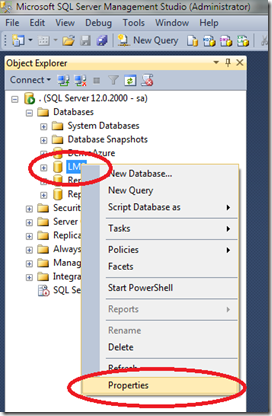
image
Click on properties and then select Options. Scroll down to change the Database to Single User mode and then click OK.


image
Now click on the Compatibility level dropdown and select the preferred compatibility level. Once you change the compatibility level then scroll down again and change the database to multi user mode.
You are done now!!!

I would like to offer you further reading in this regard too, here is the MSDN link related to the same topic.

I hope you enjoyed reading this and learnt something interesting.

Monday, December 30, 2013

How to use NuGet Package Manager for Visual Studio 2013

Have you ever heard about NuGet Package? Do you know how to use NuGet Package manager and how to install AJAXControlToolkit using NuGet Package Manager. Here is the answer for all your doubts related to NuGet Package manager for Visual Studio.

Pre-Requisite: System with Visual Studio 2013 and Good Internet Connection

First we will download NuGet Package manager for Visual Studio 2013. You may use the this link :NuGet Package Manager for Visual Studio 2013 for downloading the package.

Once you install the package open Visual Studio 2013 and open the Package Manager Console.

Refer below image to know how to open NuGet Package Manager Console.

image

Once you click on the Package Manager Console you will find a consol window link below

image

Here is the place you execute the command install AjaxControlToolkit. As I mentioned earlier you should have good internet connection to download the AjaxControlToolKit otherwise it will throw error.

The command you execute to install AjaxControlToolkit is :PM> Install-Package AjaxControlToolkit

image

Once you execute the command Install-Package AjaxControlToolkit it may take few seconds and you will below updates,

image

Finally when the installation completes you will find below updates,

image

There are many inbuilt commands available in NuGet you can find the help by running the command get-help NuGet and explore all possible options.

Tuesday, March 20, 2012

Best of Microsoft Management Summit (UK) 2012‏


82141_d6 MMS Email

Learn about 2012's exciting wave of Microsoft Private Cloud product launches and announcements – starting with the release of System Center 2012.
Get the latest insights into the Microsoft Private Cloud and learn what's new in System Center 2012. The Best of MMS 2012 brings you the highlights from MMS 2012 conference in a choice of UK-wide one-day or virtual events.

Register for the event using the link Launching System Center 2012

Tuesday, March 13, 2012

Visual Studio 11 Beta in LIVE now


Happy news for all .NET developers who was waiting to have glance on Visual Studio 11 Beta.

You can download Visual Studio 11 Beta from Microsoft download centre now.

Please check this link to download the Visual Studio 11 Beta