Showing posts with label Windows. Show all posts

Thursday, October 23, 2014

How to add additional disk in Microsoft Azure Virtual Machine

Today lets see how to add additional disk in your windows azure virtual machine. If you are a cloud architect then this will be one of the very common activity you may do periodically.
Lets start with step by step.
As usual first you have to login to your Azure account. Once you login directly go to the Virtual machine section and select the machine on which you wanted to add the additional disk space.
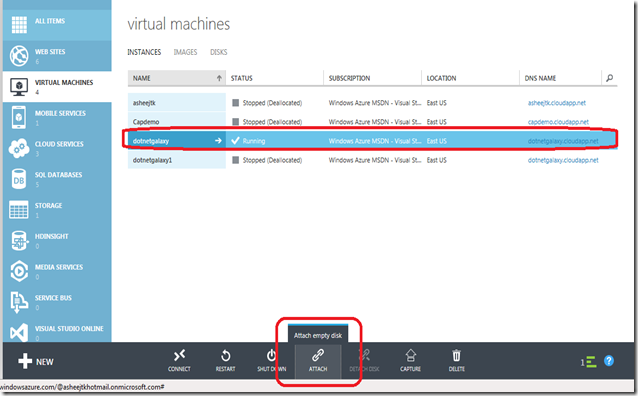
VM1

Monday, July 7, 2014

What is KUDU - Windows Azure Web Sites analysis tool

When I got to know about this KUDU I was thinking who named this KUDU! You also might be thinking about this. But here we are not going to discuss that…we will see what is the use of KUDU and how we can use this in our Azure website.
What is KUDU —> KUDU is a very user friendly troubleshooting and analysis tools for Windows Azure Web Sites.
Now we will see how to access KUDU console of your azure website. It is a very simple method.

Tuesday, March 6, 2012

Download for Internet Information Services (IIS) 8.0 Express Beta is now live


Happy news for the developers. Microsoft announce that download for IIS 8.0 Express Beta is now live.  You can download the same using the following URL:

http://www.microsoft.com/download/en/details.aspx?id=29055

The IIS 8.0 version of IIS Express shares more of its foundation with the full version of IIS, so you may not face much issues when you switch between your development environment and your production environment.

More details are available in the ReadMe file for IIS Express, which is can be seen at the following URL:

http://learn.iis.net/page.aspx/1266/iis-80-express-beta-readme/

Wednesday, March 30, 2011

Where is GAC physical Location in windows Operating System

Where is GAC physical Location in windows Operating System:-

I Noticed that many people asking this question in many forums. So I thought I will share this with everyone through my blog.

GAC is located in C:\windows\assembly

To open the folder directly
Start-->Run--> Type Assembly and press Enter.