Showing posts with label Stored Procedure. Show all posts

Saturday, January 31, 2015

Rank VS Dense_Rank in MS SQL

Today we will some interesting SQL feature. You would have seen in SQL RANK and DENSE_Rank function. Did you ever think why we have these two functions and what exactly is the difference between RANK and DENSE_RANK in MS SQL.

My task for the day is to teach you the difference between RANK and DENSE_Rank in MS SQL.

First I will give a small description about the difference and then we will go through the sample.

RANK—> Rank function will help you to find the RANK within your ordered partition. If you have same rank for the two rows then the next rank will be skipped. Which means if you have 3 items with the same rank as 3 then the next rank will be 6. 4th and 5th rank will be skipped.

DENSE_RANK—> Dense_Rank function will help you to rank the the item within your partition same like RANK function but it will not skip any ranking, it will be consecutive. Which means if you have the same scenario we taken above that is 3 items with the same rank as 3 then the next rank will be 4 in case of dense_rank.

Now lets see the demo.

First we will create the table
CREATE TABLE [dbo].[tblStatistics](
    [ID] [numeric](18, 0) NULL,
    [Name] [varchar](50) NULL,
    [Salary] [numeric](18, 0) NULL,
    [City] [nchar](20) NULL
) ON [PRIMARY]
 
 
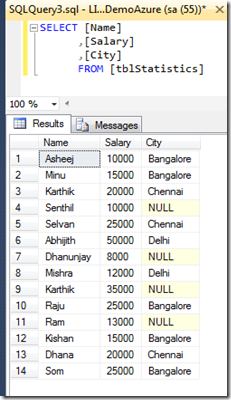
Lets query the table and see the output,
image
Above one is the simple select query. Now we will query using RANK and DENSE_RANK together to see the difference.

Rank and Rank_Dense query syntax is slightly different from our regular query as you have to mention the partition in query.

 
SELECT [Name]
      ,[Salary]
      ,[City]
      ,RANK() over (partition by City order by Salary) Rank_Demo
      ,dense_rank() over (partition by City order by Salary) Dense_Rank_Demo
      FROM [tblStatistics]
 
Lets execute above query and see the result.

image
You would have noticed that the skipping happened in the RANK for Rank column and consecutive rank for the Rank_Dense column in the above screen print.

That’s all..now you learned the difference between RANK and DENSE_RANK in SQL.

Thanks for reading my article!

Monday, November 10, 2014

Filtered Index in MS SQL

What is filtered index? What is the benefit of using filtered index? Does filtered index really improves the performance? All these queries will be answered in this article.
Lets start with what is filtered index? A kind of interview question.
Filtered index is an optimized non clustered index. Filtered index is more suitable for the queries which select the data from a well defined subset. Important thing you have to remember about the filtered index is it uses the filter predicate to index only a portion of rows in a table. This is what I have mentioned above that “filtered index is suitable for the queries which select the data from a well defined subset”.
Does the filtered index improve the performance?

Monday, October 27, 2014

Connect LocalDB using Visual Studio

Today let me answer few interview question and answer about local DB. We are going to cover, What is LocalDB? How to start LocalDB? How to stop LocalDB? How to connect LocalDB from visual Studio? How to create tables in LocalDB using Visual Studio.
Lets start with what is Local DB?
In earlier version Visual Studio installation SQL express edition gets installed automatically. People were really confused with this database and was having difficult time in connecting and managing this database. So from Visual Studio 2012 onwards Microsoft decided to have LocalDB engine in place of SQL Server express. This is a very light weight database with a minimum set of files required to create a database and it will directly tied up with the project it is attached to.
Lets see how to start LocalDB.

Thursday, September 4, 2014

GROUPING SETS in MS SQL

I have been doing some reporting work today. In that report I have to show some trending. In fact I have to show average salary based on the city and department. I was thinking what will be the easiest option to display in that manner, only thing is I don’t want to write huge SQL query to show this data.  Nothing to worry now, you have an option in MS SQL that is nothing by grouping set.
Today we will see how we can use GROUPING SET in SQL query and when exactly we can use this query.
First we will create a table with the name tblStatistics.

Friday, August 1, 2014

GROUP BY clause to get comma separated values in MS SQL

Today we will see how to get the comma separated values from SQL table. This may require during the project development to send the report or to send an email to multiple people.
 
We will create the table first.
CREATE TABLE [dbo].[StatusReport](
    [StudentID] [int] NULL,
    [Status] [nchar](10) NULL,
    [Email] [varchar](50) NULL
)

Tuesday, December 31, 2013

What is SET NOCOUNT in SQL Server

You must have seen the statement SET NOCOUNT ON in most of the stored procedure. When I saw this message first time I was thinking why this has been used in almost all stored procedure what will happen if I set SET NOCOUNT OFF in place of ON. Here in this article I thought I will share you the advantage of using SET NOCOUNT ON in SQL Stored Procedure and how this will improve the performance of your query.

The main advantage of using SET NOCOUNT ON in your stored procedure or TSQL statement is, this statement automatically suppress the message which shows how many rows has been affected by the query. Which means, this will reduce the overhead of the server and improves the performance when you execute query in a table which has got millions of data.

What exactly is happening inside the server is when you execute a stored procedure with SET NOCOUNT ON  it prevents the sending of DONE_IN_PROC messages to the client for each statement in your stored procedure. Imagine you have a loop or several statement has to be executed!!! So using SET NOCOUNT ON will definitely boost your query performance and adding the line SET NOCOUNT ON is one of the main DBA tasks when they find that query or procedure is not performing well.

If you wanted to know the message of affected rows then you can add SET NOCOUNT OFF in your query. This will show the number of rows affected by executing the query.

Irrespective of using SET NOCOUNT ON or SET NOCOUNT ON  SQL server internally updates @@ROWCOUNT function. So querying @@ROWCOUNT function will give you the affected rows details at any time.

Now let’s see how it shows in SQL query analyzer,

Below is my stored procedure, you can notice that I have commented the line SET NOCOUNT ON. 

CREATE PROCEDURE [dbo].[sp_GetCustomerList]
AS
BEGIN
    --SET NOCOUNT ON;
    SELECT * from Customer
END
 

We will execute this procedure and see the result.

image

Now we will un comment the line SET NOCOUNT ON and see the output,

CREATE PROCEDURE [dbo].[sp_GetCustomerList]
AS
BEGIN
    SET NOCOUNT ON;
    SELECT * from Customer
END

image

Hope you are now clear about the usage of SET NOCOUNT ON.

Wednesday, April 11, 2012

How to call Stored Procedure from Trigger in MS SQL


Another interesting Interview question “Can we call Stored procedure form Trigger in MS SQL”? What will be your answer YES or NO? Answer should always be “YES”.

You can call Stored Procedure from trigger. In this article we will go through a simple After Insert trigger as an example.

create trigger trg_Ins_CustTrigger on Customer
After Insert 
AS
Declare @Name as varchar(100)
Declare @Address as varchar(100)
select @Name=Name, @Address=Address from inserted
exec CustDet @Name, @Address
 

I believe above code is self explanatory as the table and field names I have used is a clear English text.

If you have any question please post it in comment section.

Monday, March 12, 2012

List all Stored Procedure Names and Scripts in the database.


Below SQL query can be used to display all Stored Procedures and SQL Scripts used to create those Stored Procedure in your database.

SELECT  sysObj.Name as [Stored Procedure Name], sysM.Definition as [Stored Procedure Script]
FROM sys.sql_modules as sysM INNER JOIN sys.objects as sysObj 
ON sysM.object_id = sysObj.object_id 
WHERE sysObj.type = 'P'

If you need more sample please refer my articles: Stored Procedures

Saturday, August 14, 2010

Display all Stored Procedures containing a particular string in MS SQL

 
Use below query to display the complete list of Stored Procedures in the database containing a particular string.

SELECT ROUTINE_NAME, ROUTINE_DEFINITION FROM INFORMATION_SCHEMA.ROUTINES 
WHERE ROUTINE_DEFINITION LIKE '%User_ID%' AND ROUTINE_TYPE='PROCEDURE'

Out put of the above query will be the list of Stored Procedures containing the string "User_ID" in your database.

Tuesday, March 3, 2009

List all the Stored Procedures Associated with a specific Table

DECLARE @TABLENAME VARCHAR(50)
SET @TABLENAME='<table name>'    --Pass the Table Name here
SELECT @TableName as [Table Name],A.Name AS [SP Name],B.Text as [SP Text] from SYSOBJECTS A
INNER JOIN SYSCOMMENTS B
ON A.ID=B.ID 
WHERE B.TEXT LIKE '%'+@TableName+'%'
and A.TYPE='P'
Same way we can use this to find out View, Trigger etc..
V: View
TR: Trigger

See the out put…

Friday, February 20, 2009

SQL Query to list all Users or Login Names from the database

This will be very useful when you want to know who all are having access to the database.
Execute the below stored procedure,
sp_helpuser 
out put of this stored procedure will be
UserName, GroupName, LoginName, DefDBName, UserID, SID