Monday, September 2, 2013

The Report Server Installation Is Not Initialized (rsReportServer Not Activated)

This is one of the common error you may get when you rebuild or restore or upgrade your reporting server database and browse the report service manager URL. You may get the similar error when you browse the .rdl report also which was working earlier when your server was running fine.

To resolve this error you may follow one of the below steps,

Option 1:

  • Open Reporting Services Configuration Manager
  • Go to Encryption Keys
  • Delete Encrypted Content
  • Click on Delete

Option 2:

  • Go to Reporting Services Configuration Manager.
  • Go to "Encryption Keys" to backup the key.
  • Navigate to "Database" tab.
  • Click "Change Credentials" to reset the connections.

Now you will be able to browse the report without any issue.

Thursday, August 15, 2013

How to find all Saturday and Sunday of the Current Month in MS SQL

I have seen many people asking the question “How to show all Saturdays and Sundays of the current month” in forums, so I thought I will try which is the best and easiest solution for this requirement.

Here I am going to use common table expression (CTE) to show the week ends with the date of the month. Below is the actual query you can use to find all the weekends of the current month with date.

 
WITH CTE(DATE, DayOfTheMonth)
AS
(
SELECT DATEADD(DAY, -DAY(GETDATE()-1), GETDATE()), 1
UNION ALL
SELECT DATE+1, DayOfTheMonth+1 FROM CTE WHERE DayOfTheMonth < (SELECT DAY(DATEADD(DAY, -DAY(DATEADD(MM, 1, GETDATE())), DATEADD(MM, 1, GETDATE()))))
)
 
SELECT DATENAME(WEEKDAY, DATE) AS WeekDay_Name, DayOfTheMonth INTO #TempDateTable FROM CTE OPTION(MAXRECURSION 30)
 
SELECT * FROM #TempDateTable WHERE WeekDay_Name IN('Saturday', 'Sunday')
 
DROP table #TempDateTable


When you execute above query you will get the out put as

WeekDay_Name DayOfTheMonth
Saturday 3
Sunday 4
Saturday 10
Sunday 11
Saturday 17
Sunday 18
Saturday 24
Sunday 25
Saturday 31

Depends on the Month your DayOfTheMonth value will change. Since I am executing this in August 2013 it shows the records for that month.

image

Wednesday, August 14, 2013

List all tables in the SQL Database without Primary Key

Last week I was facing some issues with the application which I have been developing. Query was not working properly when somebody loaded huge test data in a table. when I checked the table I found that primary key was not created for that table even though it was not mentioned the database schema we have prepared. So I thought I will run a query to find out all the tables in the database which doesn’t have primary key.

Since I already created the query to find out all the tables without primary key in MS SQL database of course I have to share that with you also…

SELECT [schema_id] AS [Schema Name],[name] AS [Table Name], [type_desc] as [Table Type]
FROM sys.tables
WHERE OBJECTPROPERTY(OBJECT_ID,'TableHasPrimaryKey') = 0
 

Output of above query will be,

Table Names without primary key

Monday, August 5, 2013

How to enable Script debugging in web browser?

In this article I am going to explain you how to debug JavaScript or how to enable Script Debugging.

I have seen many people posting question in forum asking I am getting “Java script rut time error” and how to resolve this issue. Interestingly they post whole JavaScript also for the solution. With my experience it is bit hard to find out the actual issue in JavaScript if you are not able to find the exact line you are getting this exception.

Many people still not aware that we can debug JavaScript and find out the exact line where we are getting the script error.

To find the exact line where the exception is showing first we will enable the Script debugging in web browser. In this example I am using Internet Explorer.

To enable the JavaScript debugging in Internet Explorer follow below steps.
Open IE-->Go to Tools-->Internet Options—>Select Advanced Tab—>

Scroll down to Browsing section-->Un Check "Disable Script debugging (Internet Explorer)" and Uncheck "Disable script debugging (Other)" and Check "Display a notification about every script error".

Script Debugging

Click Ok to save the changes.

Now close your browser and open your web page and see the error message as pop up.

Script Debugging1

Click yes to open the script debugging and see in which line you are getting this error. Exact line you are getting this exception will be highlighted.

Script Debugging2

Now it will be very easy for you locate the line your script from your .aspx page.

Sunday, July 21, 2013

Server Error in '/' Application, Maximum request length exceeded

Below is one of the common error developers get when they try to upload huge files using ASP.NET application.

Error description:

Server Error in '/' Application.
--------------------------------------------------------------------------------

Maximum request length exceeded.
Description: An unhanded exception occurred during the execution of the current web request. Please review the stack trace for more information about the error and where it originated in the code.

Exception Details: System.Web.HttpException: Maximum request length exceeded.

Source Error:

An unhandled exception was generated during the execution of the current web request. Information regarding the origin and location of the exception can be identified using the exception stack trace below.

Reason:

users are trying to upload huge files which is more than the default size allowed by .NET Framework.

Solution:

Change below settings in web.config depends on the IIS version you are using.

For IIS6

<configuration>
    <system.web>
        <httpRuntime maxRequestLength="1048576" />
    </system.web>
</configuration>

For IIS7

<system.webServer>
   <security>
      <requestFiltering>
         <requestLimits maxAllowedContentLength="1073741824" />
      </requestFiltering>
   </security>
 </system.webServer>

You may change the values depends on the file size you want to allow the users to upload.

Try to run your application and upload some files!!!

Tuesday, July 2, 2013

Renewed Microsoft MVP award fourth time a row…

I am deeply honored and humbled to have been selected for the MVP (Microsoft Most Valuable Professional ) award 4th time a row, I would like to express my sincere thanks to all the DotNetSpider members, Tony John and all who supported me during this journey...

Tuesday, April 30, 2013

Microsoft.SqlServer.Management.Common.ExecutionFailureException: An exception occurred while executing a Transact-SQL statement or batch. ---> System.Data.SqlClient.SqlException: Incorrect syntax near ''

I have received this ‘Microsoft.SqlServer.Management.Common.ExecutionFailureException: An exception occurred while executing a Transact-SQL statement or batch. ---> System.Data.SqlClient.SqlException: Incorrect syntax near '<some Keyword>' error when I migrated my application from SQL server 2005 to SQL server 2008.

What happened is after migration, database compatibility was still set to previous version. So when we ran any SQL script which doesn’t support previous version will throw error.

To resolve this, you just need to login to the SQL server and change the compatibility level.

If you are getting this error while migrating the database from SQL 2000 to SQL 2005 then you may select the option “SQL Server 2005 (90)”

If you are getting this error while migrating the database from SQL 2005 to SQL 2008 then you may select the option “SQL Server 2008 (100)”

If you are a database admin then you can directly open the SQL query analyzer and execute below SQL query,

EXEC sp_dbcmptlevel 'DatabaseName', 90 ---This is for SQL 2005 Migration
EXEC sp_dbcmptlevel 'DatabaseName', 100 --–This is for SQL 2008 Migration

Steps to follow if you are doing it directly on server,

  • Login to the database server.
  • Locate the database you are getting this error
  • Right click on the database and select Properties
  • Go to “Options” Page
  • Here you will find the option to change the “Compatibility Level”

Below screen print will give you the clear idea of all the options and what you need to change.

Change Compatibility Level

You are always welcome to post your comments below.

Sunday, April 21, 2013

How to read PDF content using iTextSharp in .NET

How to read PDF content using .NET?” is one of the very common questions you normally found in almost all Microsoft forum. Since I have been answering this question with sample code most of the time in I thought I will write a short article with detailed explanation.

Here I am going to use iTextSharp.dll to read the PDF file. iTextSharp is a C# port of iText, and open source Java library for PDF generation and manipulation. You can download the DLL from sourceforge.net using this download iTextSharp link.

Now we will start the .NET coding part to use the iTextSharp.

As this is a sample programe I am going to add only 3 controls. One FileUpload Control to locate/browse the PDF file, one button to show the content in a label and finally a label display the PDF content.

First we will see the PDF file and it’s content we are going to read.
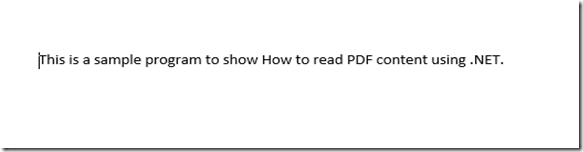
PDF Content To read using .NET

No we will design our .ASPX page, as I mentioned above we have only three controls.

<%@ Page Language="C#" AutoEventWireup="true" CodeBehind="WebForm1.aspx.cs" Inherits="Sample_2012_Web_App.WebForm1" %>
<!DOCTYPE html>
<html xmlns="http://www.w3.org/1999/xhtml">
<head runat="server">
    <title></title>
</head>
<body>
    <form id="form1" runat="server">
    <div>
    
    </div>
        <asp:Label ID="Label1" runat="server" Text="Please select the PDF File"></asp:Label>
&nbsp;<asp:FileUpload ID="PDFFileUpload" runat="server" />
        <br />
        <br />
        <asp:Button ID="btnShowContent" runat="server" OnClick="btnShowContent_Click" Text="Show PDF Content" />
        <br />
        <br />
        <asp:Label ID="lblPdfContent" runat="server"></asp:Label>
    </form>
</body>
</html>

Below image shows you the interface we have created,

.NET Interface to read PDF Content

Now we will see the C# code to read the PDF content. Before start writing the code we need to add reference to the iTextSharp.dll. So from your solution explorer right click on the Reference and click on Browse button to locate the DLL file you have stored from the downloaded source code.

Once you add the reference we have to add the namespaces like below,

using iTextSharp.text.pdf;
using iTextSharp.text.pdf.parser;

Now we will see the complete source code.

using System;
using System.Collections.Generic;
using System.Linq;
using System.Web;
using System.Web.UI;
using System.Web.UI.WebControls;
using iTextSharp.text.pdf;
using iTextSharp.text.pdf.parser;
using System.Text;
namespace Sample_2012_Web_App
{
    public partial class WebForm1 : System.Web.UI.Page
    {
        protected void Page_Load(object sender, EventArgs e)
        {
        }
        protected void btnShowContent_Click(object sender, EventArgs e)
        {
            if (PDFFileUpload.HasFile)
            {
                string strPDFFile = PDFFileUpload.FileName;
                PDFFileUpload.SaveAs(Server.MapPath(strPDFFile));
                StringBuilder strPdfContent = new StringBuilder();
                PdfReader reader = new PdfReader(Server.MapPath(strPDFFile));
                for (int i = 1; i <= reader.NumberOfPages; i++)
                {
                    ITextExtractionStrategy objExtractStrategy = new SimpleTextExtractionStrategy();
                    string strLineText = PdfTextExtractor.GetTextFromPage(reader, i, objExtractStrategy);
                    strLineText = Encoding.UTF8.GetString(ASCIIEncoding.Convert(Encoding.Default, Encoding.UTF8, Encoding.Default.GetBytes(strLineText)));
                    strPdfContent.Append(strLineText);
                    reader.Close();
                    strPdfContent.Append("<br/>");
                }
                lblPdfContent.Text = strPdfContent.ToString();
            }
        }
    }
}

Finally we will see the output.

How to read PDF Content using .NET output

As usual you are always welcome to post your comment below.

Monday, March 25, 2013

How to do animation in .NET using jQuery

In general everybody likes animation. Earlier animation in a page was a difficult tasks. Now after jQuery library animation can be done using two lines of code.

In this article I am going to explain you how to do animation in a webpage using jQuery.

First you have to download the jQuery library. Use the jQuery download page to download the library. If you don’t wanted to download you can add the reference directly as well. Here in this article I am directly referring the jQuery library.

Now we will see the complete code used for animation. I have tried to explain most of the details in the code itself and rest of the codes are self explanatory.

<%@ Page Language="C#" AutoEventWireup="true" CodeBehind="Animations.aspx.cs" Inherits="Sample_2012_Web_App.CustomerDetails" %>
<!DOCTYPE html>
<html xmlns="http://www.w3.org/1999/xhtml">
<head>
    <title>jQuery Animation Sample</title>
        <script src="http://code.jquery.com/jquery-1.9.1.min.js"></script>
    </head>
<body>
    <button id="GoLeft">&laquo;Move Left</button>
    <button id="GoRight">&raquo;Move Right</button>
    <div class="block" style="position:absolute;background-color:#f00;left:100px;width:200px;height:100px;margin:20px;">This box is going to Animate</div>
    <script>
        $("#GoRight").click(function () {
            $(".block")
            .animate({ "left": "+=100px" }, "slow")//This code will move the box Right.
            .animate({ "height": "250px" }, 500)//This code will increase the height.
            .animate({ "width": "250px" }, 500)//This code will increase the width.
            .animate({ "opacity": "0.15" }, "slow")//This code will reduce the Opacity.
            .animate({ "opacity": "1" }, "slow")//This code will increase the Opacity.
            .animate({ "height": "100px" }, 500)//This code will reduce the increased height.
            .animate({ "width": "100px" }, 500);//This cide will reduce the increased width.
        });
        $("#GoLeft").click(function () {
            $(".block")
            .animate({ "left": "-=100px" }, "slow")
            .animate({ "height": "250px" }, 500)//This code will increase the height.
            .animate({ "width": "250px" }, 500)//This code will increase the width.
            .animate({ "opacity": "0.15" }, "slow")//This code will reduce the Opacity.
            .animate({ "opacity": "1" }, "slow")//This code will increase the Opacity.
            .animate({ "height": "100px" }, 500)//This code will reduce the increased height.
            .animate({ "width": "100px" }, 500);//This cide will reduce the increased width.
        });
</script>
</body>
</html>

When you look at the code you can see that I have written many animate code on click of the button. Actually that is the beauty of jQuery. Add as many animation code and make it interesting.

There are many more animation options available but I have limited here with 6 or 7 options.

Below is the interface I have created for animation.

Animation using jQuery

Let me know your feed back after trying this feature in jQuery

Wednesday, February 20, 2013

Techweets–MVPs from South Asia region will be on Twitter on Friday


I am very excited to blog this event. All south Asia MVP’s are on twitter on all Fridays from 9 AM to 9PM.

IF you are looking for tips and techniques from Microsoft Most Valuable Professionals then be on twitter.

Here is the official announcement: Techweets

Monday, August 20, 2012

Debugging is not supported under current trust level settings?

Today When I was debugging a test website I created for learning I got the error “Debugging is not supported under current trust level settings?

This error normally occurs when you keep the website directly under C:\inetpub\wwwroot folder. Anyway that is not a subject here. We will directly go to the simple solution to resolve the issue.

Open your Web.config and add below line in

<system.web>
    <trust level="Full"/> 
    .....
    .....
</system.web>

Tuesday, August 7, 2012

Window.Confirm in JavaScript.


Most of the time during web application development you may get a requirement to redirect the page based on user choice.

Here I am going to show you how to redirect to an another web page or site on click of a JavaScript Ok button.

If you use Window.Confirm in JavaScript you will get OK and Cancel button. So we will redirect to another page only if user click on OK button. If user Click on Cancel button then we will stay on the same page.

So test the code first we will create a simple button

Below is the .ASPX code for creating a button.

<body>
<form id="form1" runat="server">
<div>

</div>
<asp:Button ID="btnSubmit" runat="server" onclick="btnSubmit_Click"
Text="Submit" />
</form>
</body>

Now in Code behind we will write the JavaScript code to redirect to another website.

protected void btnSubmit_Click(object sender, EventArgs e)
{

ScriptManager.RegisterStartupScript(this, this.GetType(), "alertmessage", "javascript:if (window.confirm('You will be redirected to Dotnet Galaxy. Click OK to confirm')) { location.href = 'http://asheej.blogspot.in/'; }", true);

}

Now we will see how the alert will be
Cinfrim box in JavaScript

Monday, July 30, 2012

How to replace carriage return and line feed in a SQL server varchar field


I have been facing an issue while importing some data from SQL to CSV file. In one of my SQL fields user entered Enter Key or Line feed, because of that my exported CSV file was not in good format. Rows were broken in between. So I started searching for a solution to replace carriage return and line feed and finally accomplished by writing below query.

SELECT replace ( replace(Col1, char(10),''), char(13), '') as [Column 1] FROM  Test

In the above code "col1" is the column name where you have enter key or line feed and "Test" is the table name.

After using this query I was able to export the data to CSV with proper formatting as I required.

I hope this query may help you also.

Sunday, July 15, 2012

How to validate RadioButton using C#


Validating radio button in ASP.NET is not very tough but new programmers always get confused about this and ask the questions in forum for the help. So I thought I will write a simple article related to this topic.

Here I am going to use JavaScript to validate the RadioButton.

First we will create the RadioButton.

<asp:Label ID="Label1" text ="Please select one of your favorite fruits" runat="server"></asp:Label>

<asp:RadioButtonList ID="radiobutton1" runat="server">

<asp:ListItem Text="A.Apples">Apple</asp:ListItem>

<asp:ListItem Text="B.Banana">Banana</asp:ListItem>

<asp:ListItem Text="c.cherry">Orange</asp:ListItem>

<asp:ListItem Text="D.Dates">Grapes</asp:ListItem> </asp:RadioButtonList>

<asp:Button ID="btnSubmit" runat="server" onclick="btnSubmit_Click"

Text="Submit" />

If you look at the above code I have created a RadioButtonList with 4 RadioButtons and a Button.

Now we will write the JavaScript to validate the RadioButtonList

<script type="text/javascript">

function rdValidate()

{

var rd = document.getElementsByName('radiobutton1')


for (var i = 0; i < rd.length; i++)

{

if (rd[i].checked)

{

return true;

}

};

alert("Please select an option");

return false;

}

</script>


Next we will call the JavaScript function to validate the RadioButtonList on Button Click Event.

protected void btnSubmit_Click(object sender, EventArgs e)

{

ClientScript.RegisterStartupScript(GetType(), "Alert", "<script>rdValidate();</script>");

}

That’s it. Now you can run your application and click on the button click event without selecting the RadioButton. You will get the alert message like in below screen print.

Validate Radio Button using JavaScript

Please post your query if you have any in below comment section.

Thanks for reading this article.

Monday, July 2, 2012

Renewed Microsoft MVP Third time a row…


I am very happy to inform you all that my MVP status has been renewed third time in row. It’s a very proud moment for me. Thank you all my readers and www.dotnetspider.com members for the support and guidance.