In order to debug the Azure website remotely first you have to open Server Explorer from the View menu. Once you click on the Server Explorer just expand the Windows Azure section. If you are not logged in to Azure account It may prompt you to login. Once you connect to your Windows Azure account you will be able to see all your websites which is already hosted in your Azure account.
Thursday, December 11, 2014
Not able to see Attach Debugger in Visual Studio for remote debugging in Azure
In order to debug the Azure website remotely first you have to open Server Explorer from the View menu. Once you click on the Server Explorer just expand the Windows Azure section. If you are not logged in to Azure account It may prompt you to login. Once you connect to your Windows Azure account you will be able to see all your websites which is already hosted in your Azure account.
Wednesday, December 10, 2014
How to find the files deployed in Windows Azure from Visual Studio.
Today we will see how to view the deployed website files in visual Studio and how to edit those files form Visual Studio.
Thursday, December 4, 2014
Disadvantage of enabling Session State in all ASP.NET pages
As you are aware session data is stored in the server if you use inProc mode. So if you have huge data in session all your server resource will be utilized. So the first thing is make sure whatever you are writing into the session is really required to be stored in session and clear the session as soon as you use the data from the session.
Tuesday, November 18, 2014
Attempt by security transparent method 'System.Web.Http.GlobalConfiguration.get_Configuration()' to access security critical type 'System.Web.Http.HttpConfiguration' failed.
So the simple solution to resolve this issue is upgrade your WEB API.
Easiest option to upgrade your WEB API is by using NuGet package manager.
TransactionScope in ASP.NET
TransactionScope is exactly same as the one we use in database level. But sometimes we may not use transaction at database level if the data/table we are operating is completely different and there is no connections.
Couple of important points you have to remember while using TransactionScope is, TransactionScope class cannot be inherited, also this is part of the System.Transactions which means if you wanted to use the class TransactionScope then first you have to refer to the assembly System.Transactions.
Monday, November 10, 2014
Filtered Index in MS SQL
Lets start with what is filtered index? A kind of interview question.
Filtered index is an optimized non clustered index. Filtered index is more suitable for the queries which select the data from a well defined subset. Important thing you have to remember about the filtered index is it uses the filter predicate to index only a portion of rows in a table. This is what I have mentioned above that “filtered index is suitable for the queries which select the data from a well defined subset”.
Does the filtered index improve the performance?
Monday, October 27, 2014
Connect LocalDB using Visual Studio
Lets start with what is Local DB?
In earlier version Visual Studio installation SQL express edition gets installed automatically. People were really confused with this database and was having difficult time in connecting and managing this database. So from Visual Studio 2012 onwards Microsoft decided to have LocalDB engine in place of SQL Server express. This is a very light weight database with a minimum set of files required to create a database and it will directly tied up with the project it is attached to.
Lets see how to start LocalDB.
Thursday, October 23, 2014
How to add additional disk in Microsoft Azure Virtual Machine
Lets start with step by step.
As usual first you have to login to your Azure account. Once you login directly go to the Virtual machine section and select the machine on which you wanted to add the additional disk space.
Wednesday, September 24, 2014
How to use OUTPUT Clause in MS SQL / What is the use of OUTPUT Clause?
Today we will learn some SQL. Have you ever used OUTPUT clause in MS SQL? What exactly us the use of OUTPUT clause in MS SQL? What is the advantage of using OUTPUT clause in SQL? All these questions are answered in this article.
What is OUTPUT clause in SQL?
OUTPUT clause gives you the information about each row impacted by running INSERT or UPDATE or DELETE or MERGE SQL statement. Normally in applications we use this information to return to the user in a meaningful manner to show the result of submitting the data.
What you can do is, you may save this information in a temporary table or in a permanent table itself for future use. You can use this information for auditing purpose also because it has got complete information about the sol statement which you executed row by row.
The main disadvantage of this OUTPUT clause is it returns the same information even if your SQL execution throws error or it is rolled back. So you need to make sure that such information should not be used for any auditing purpose or to pass the information to client.
Now lets see what kind of information we gets when we use OUTPUT clause.
First we will create a sample table.
CREATE TABLE [dbo].[tblBill](
[BillDate] [datetime] NULL,[Expense] [numeric](18, 0) NULL,
[travel] [numeric](18, 0) NULL
)
GO
Lets query the table and see the values we have inserted in this table.
Now we will delete one row with the OUTPUT clause and see the result and also the syntax to use output clause.
delete from [DemoAzure].[dbo].[tblBill]
OUTPUT DELETED.* where travel = 150As you can see above OUTPUT clause should be before where clause.
Once you execute this statement it will return the complete row which got deleted like a select statement. This is the reason I mentioned earlier that we can directly insert this values into a table for future use or for auditing purpose.
Lets see the result set now.
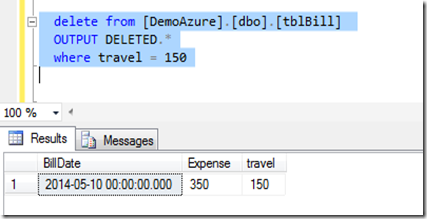
Lets see a sample code to insert the value in a table variable.
DECLARE @tblBillVar table(
[BillDate] [datetime] NULL,
[Expense] [numeric](18, 0) NULL,
[travel] [numeric](18, 0) NULL);
INSERT INTO [dbo].[tblBill] ([BillDate],[Expense],[travel])
OUTPUT INSERTED.[BillDate], INSERTED.[Expense], INSERTED.[travel]
INTO @tblBillVar
VALUES ('2015-01-06 00:00:00.000',875,475)select * from @tblBillVar
Once you execute above query you will find that the inserted values will be displayed in the query analyzer.
Similar to table variable you can have your own table as well.
I hope you are now clear about the OUTPUT clause in MS SQL.
Thursday, September 4, 2014
GROUPING SETS in MS SQL
Today we will see how we can use GROUPING SET in SQL query and when exactly we can use this query.
First we will create a table with the name tblStatistics.
Monday, August 11, 2014
Peek Definition VS Go To Definition in Visual Studio
Suppose you are debugging in your code and you reached to a function where you find an error. Earlier you have to go to the .CS page where you function is defined and have to change the code. In those case we just right click over the function and use Go to Definition option to navigate to the exact function.
Friday, August 1, 2014
GROUP BY clause to get comma separated values in MS SQL
We will create the table first.
CREATE TABLE [dbo].[StatusReport](
[StudentID] [int] NULL,
[Status] [nchar](10) NULL,
[Email] [varchar](50) NULL
)
Wednesday, July 16, 2014
How to find Quarter Name and Month Name from the Datetime in MS SQL
Since it is a simple query I thought I will share you he same as it may might be useful.
Lets create the table first.
create table Items
(
ItemName varchar(500),
uom char(200),
Quantity float(50),
Price numeric(5,2),
Bill_Date datetime
)
Monday, July 7, 2014
What is KUDU - Windows Azure Web Sites analysis tool
What is KUDU —> KUDU is a very user friendly troubleshooting and analysis tools for Windows Azure Web Sites.
Now we will see how to access KUDU console of your azure website. It is a very simple method.
Sunday, June 22, 2014
Regular expression to validate multiple Email IDs separated by comma
Regular expression you may use for this purpose is,
| ^\s*((\s*[a-zA-Z0-9\._%-]+@[a-zA-Z0-9\.-]+\.[a-zA-Z]{2,4}\s*[,]{1}\s*){1,100}?)?([a-zA-Z0-9\._%-]+@[a-zA-Z0-9\.-]+\.[a-zA-Z]{2,4})\s*$ |